
How to change Paige’s writing style, length and narration
Use the Style popover in the message box to make Paige’s prose leaner or richer and her chapters shorter or longer. Set point of view and tense for each book in “Plan your book”, and the story language, genre and tone in Projects. A word count you type in your message always beats the Length setting.
5 min readUpdated

On this page
Step by step
Step 1: Open Style
On a computer, click the Style chip in the message box. It shows your current setting, such as “Balanced”. On a phone, tap the sliders button (“How Paige writes”).
Step 2: Move the Style slider
Pick Lean, Crisp, Balanced, Rich or Lush. The line under the slider says what each one does.
Step 3: Pick a Length
Tap Short, Standard or Long. Your choice is saved for your account and used until you change it.
Step 4: Set point of view and tense
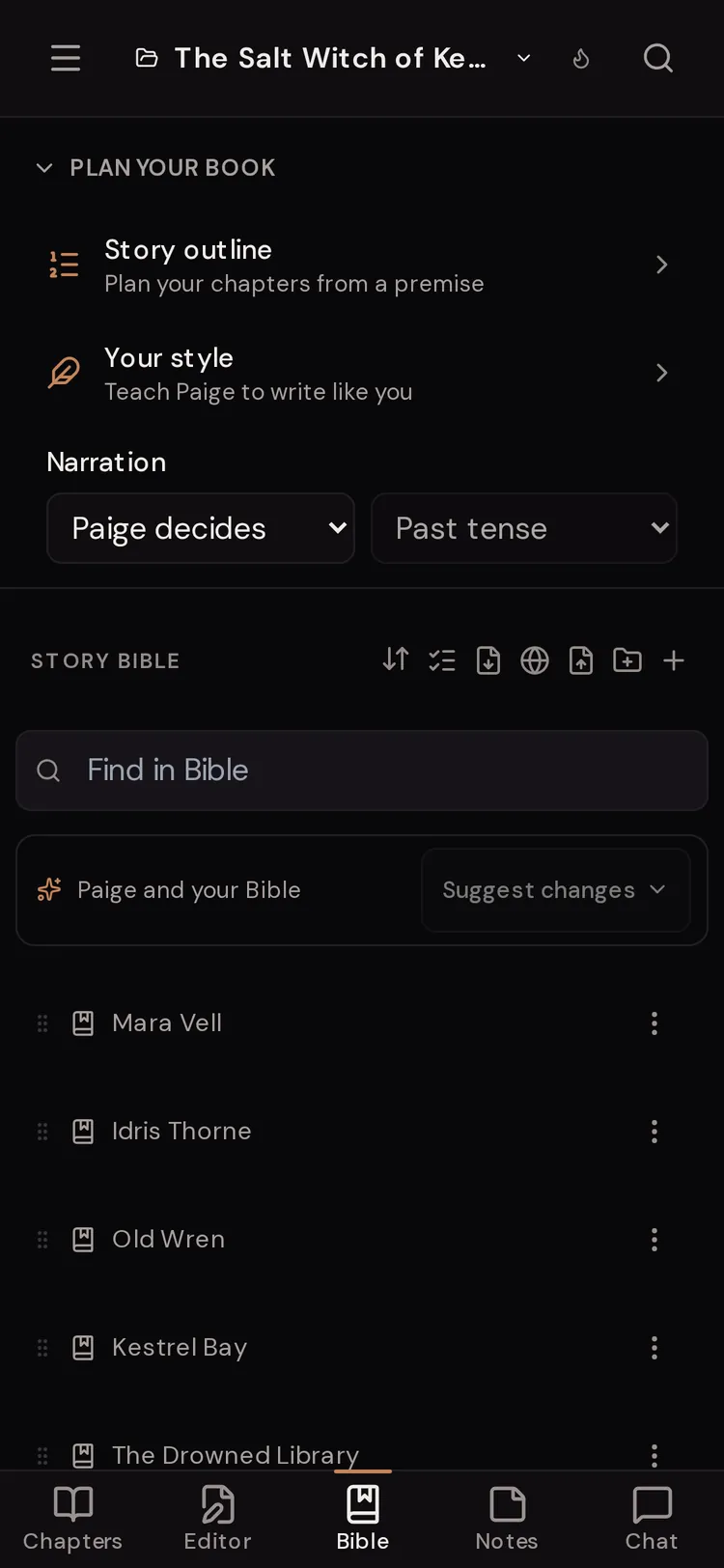
Open the Bible. In “Plan your book” at the top, find “Narration” and choose a point of view, then a tense.
Step 5: Check the book’s language, genre and tone
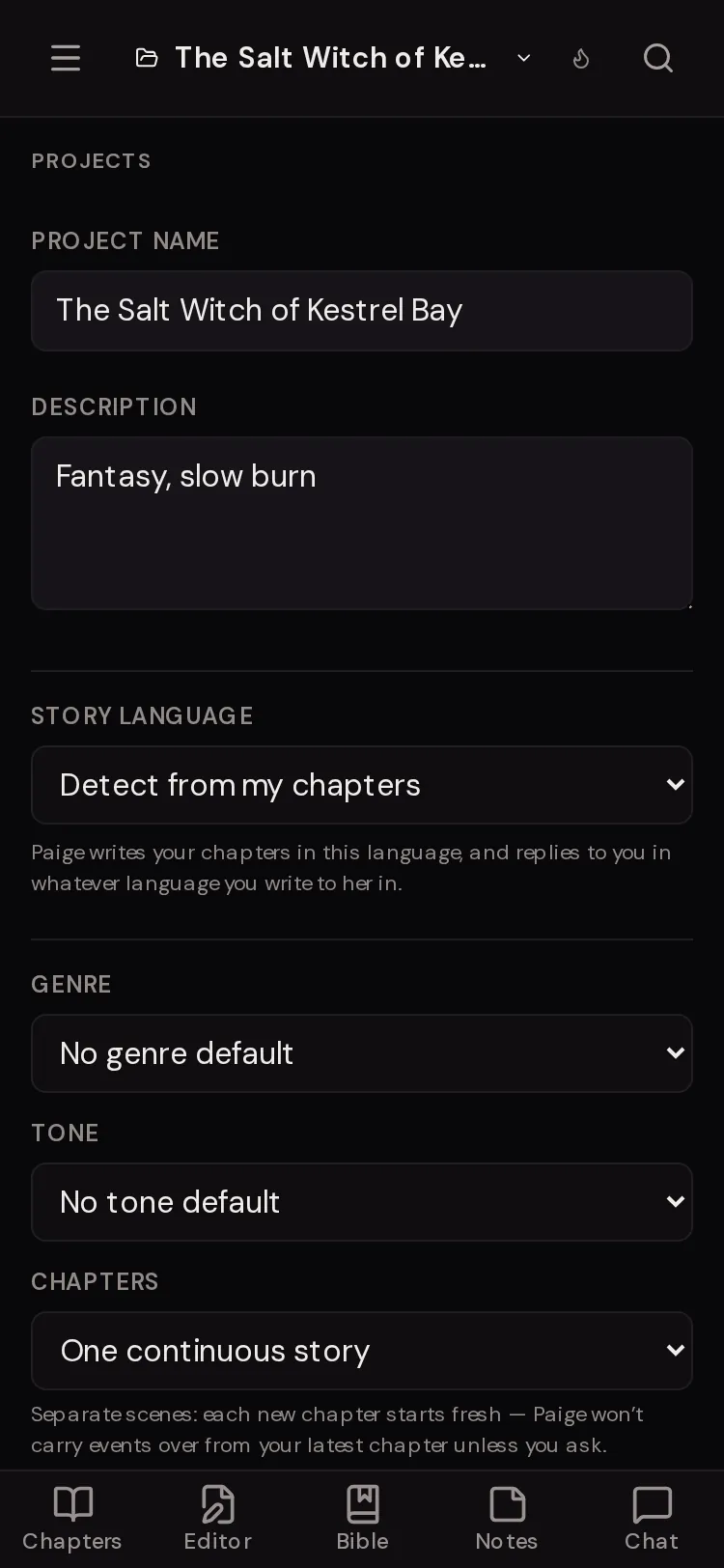
Open Projects. Set “Story language”, “Genre” and “Tone” for the open book.


The Style slider, stop by stop
Style changes how much detail and interior feeling goes into each paragraph. It does not change the story, the facts or the model Paige uses. Balanced is the default.
- Lean
- Fast and spare: all motion, one sharp detail per beat. Good for action and thrillers.
- Crisp
- Clean and cinematic: tight scenes that hit hard.
- Balanced
- “Full paragraphs that move, with room to feel.” The default.
- Rich
- Unhurried and immersive: richer detail, deep interiority. Good for romance and literary scenes.
- Lush
- Saturated with sensation: dwell, expand, stop late.
Length, and why your word count wins
Length sets how long a chapter draft runs. “Short” is “Around 900 words”. “Standard” is “A full chapter”. “Long” means “Let scenes run and breathe”.
The popover says it plainly: “A word count typed in your message always wins.” Ask for “about 2,000 words” and Paige aims for that, whatever Length says.
When a reply gets cut off, a “Continue writing” button appears under it.
Try typing
“Write chapter 6 in about 2,500 words. End on the bell in the drowned library.”
Try typing
“Give me a short scene, 400 words, just the argument on the dock.”
Narration: point of view and tense
Each book can have a fixed point of view and tense. Open the Bible and find “Narration” in “Plan your book”. Point of view choices are “Paige decides”, “First person (“I”)”, “Third limited”, “Third omniscient” and “Second person (“you”)”. Tense is “Past tense” or “Present tense”. Pick a point of view first; the tense box unlocks after that.
When saved, you see “Saved. Paige narrates this book this way.” Choose “Paige decides” to clear it. Then she follows your chapters and requests.
Your style: teach Paige to write like you
Also in “Plan your book”, “Your style” reads a sample of your own writing and describes your voice in plain words. Tap “Teach Paige to write like you”. Choose “Pick my chapters” (one or two chapters you wrote, up to 8) or “Paste writing” (500 to 3,000 words works best), then tap “Read my style”.
You get notes under headings like “How you tell it”, “Your sentences”, “Dialogue”, “Tone” and “Description”. Edit anything that doesn’t sound like you and save. The row then reads “On: Paige writes in your style”. It applies to this book only.
Story language, genre, tone and chapters
These live in the Projects panel for the open book.
- Story language
- “Detect from my chapters” or a language from the list. “Paige writes your chapters in this language, and replies to you in whatever language you write to her in.”
- Genre
- A gentle default such as Romance, Fantasy, Sci-Fi, Mystery & Thriller, Christian & Inspirational or Fanfiction. “No genre default” turns it off.
- Tone
- Emotional & character-driven, Fast-paced & plot-driven, Dark & atmospheric, Light & witty, Hopeful & uplifting, or Steamy & romantic. “No tone default” turns it off.
- Chapters
- “One continuous story” or “Separate scenes”. With separate scenes, each new chapter starts fresh and Paige won’t carry events over unless you ask.
Rewrite a reply richer
If Paige’s latest reply feels thin or choppy, tap the wand icon under it (“Rewrite this reply with richer detail”). She rewrites it in fuller sentences with more sensory detail and makes it longer. It only appears on the newest reply.
For a single line or paragraph in a chapter, select the text in the editor and use the quick rewrite options instead. For a whole new attempt, use regenerate.

Chat font and text size
To change how replies look (not how they are written), open Settings, then Appearance. “Chat response font” has “Match site” (“Same font as the rest of the interface”) and “Literary” (“Serif font, like the manuscript editor”). “Reading text size” makes chat replies, adventures and the story reader bigger or smaller.
Questions
Does the Style setting apply to all my books?
Yes. Style and Length are saved for your account. Narration, Your style, story language, genre and tone are set per book.
I asked for 3,000 words but Length is Short. What happens?
Your typed word count wins. Length only applies when you don’t give a number.
Why can’t I change Style right now?
You can’t change these while Paige is writing. On a phone the sheet says “You can change these when Paige finishes.”
Can Paige write in Spanish while I talk to her in English?
Yes. Set “Story language” to Spanish in Projects. Paige writes chapters in Spanish and replies to you in the language you write in.
Paige keeps switching between past and present tense. How do I stop it?
Open “Plan your book” in the Bible, pick a point of view under Narration, then pick the tense. Paige then narrates the whole book that way.
What is the difference between Style and a Muse?
Style is one slider for how dense the prose is. A Muse is a whole voice, with personality, style and rules. You can use both at once.
Related guides
Try it on your own story.
Start writing free